Why console.log Lies Sometimes
2026/06/26
|
2 mins to read
|
Share article
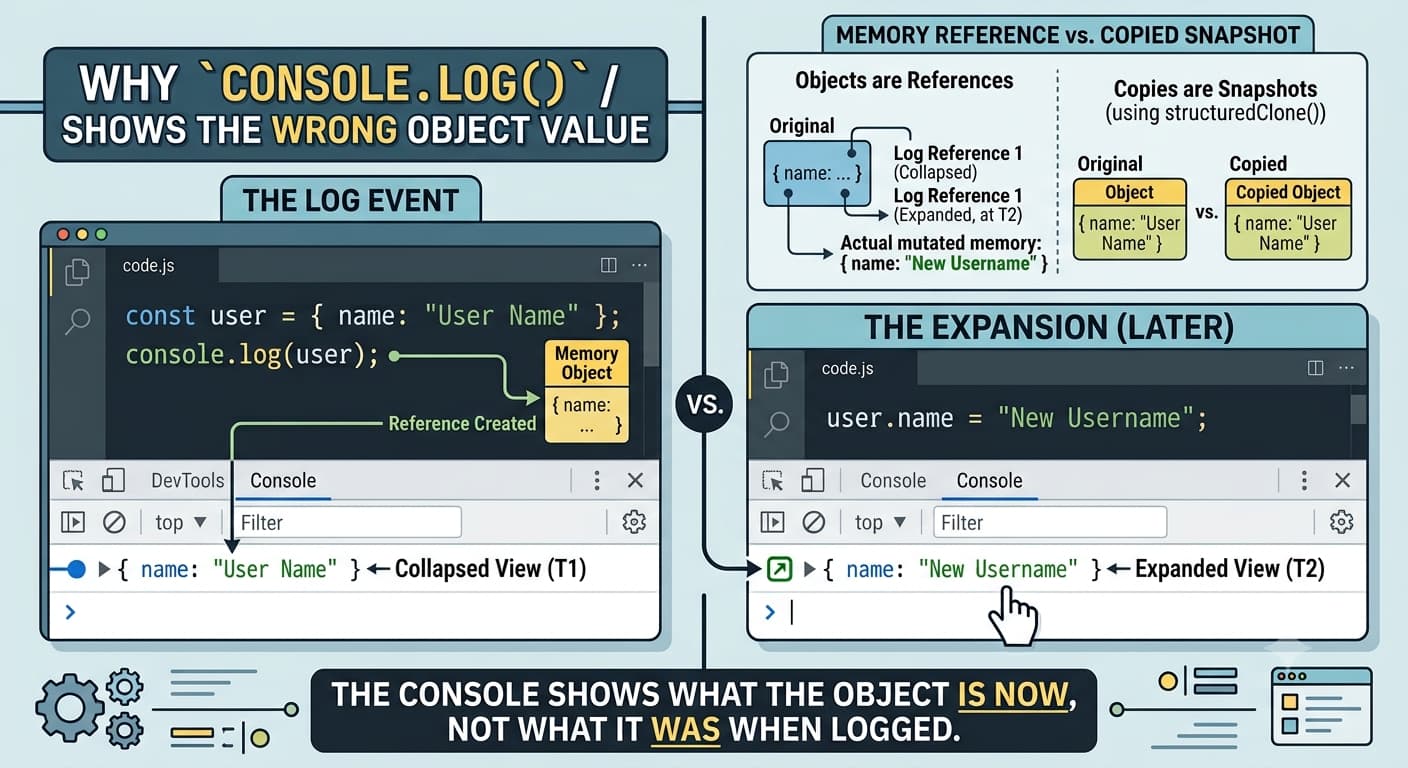
You log an object. Everything looks fine.
Then you expand it in DevTools… and suddenly the values are different.
Confusing? Absolutely.
What's Really Happening?
When you do this:
const user = { name: "John" };

console.log(user);
You might expect the console to capture a snapshot of the object at that exact moment.
But it doesn't.
Instead, DevTools logs a reference to the object — not a copy of it.
That means:
- The console is not showing "what the object was"
- It is showing "what the object is now"
A Simple Example
const user = { name: "John" };

console.log(user);

user.name = "Doe";
Now when you expand the logged object in the console, you may see:
{ name: "Doe" }
Even though at the time of logging, the value was "John".
Why Does This Happen?
Because JavaScript objects are:
- Stored by reference
- Not copied when passed to
console.log
So DevTools keeps a pointer to the original object in memory. When the object changes later, the console view reflects that change.
How to Log a Snapshot Instead
If you want to freeze the value at log time:
Option 1: JSON trick
console.log(JSON.parse(JSON.stringify(user)));
Option 2: structuredClone (modern)
console.log(structuredClone(user));
Option 3: Spread (shallow copy)
console.log({ ...user });
Important Note
This behaviour only affects how DevTools displays objects.
Your actual code is not broken.
It is just showing a live view of memory.
Final Thought
Next time you see a "wrong value" in console.log, don't panic.
Your code probably isn't broken.
The object just changed after you logged it.