Git Bisect
2025/12/12
|
5 mins to read
|
Share article
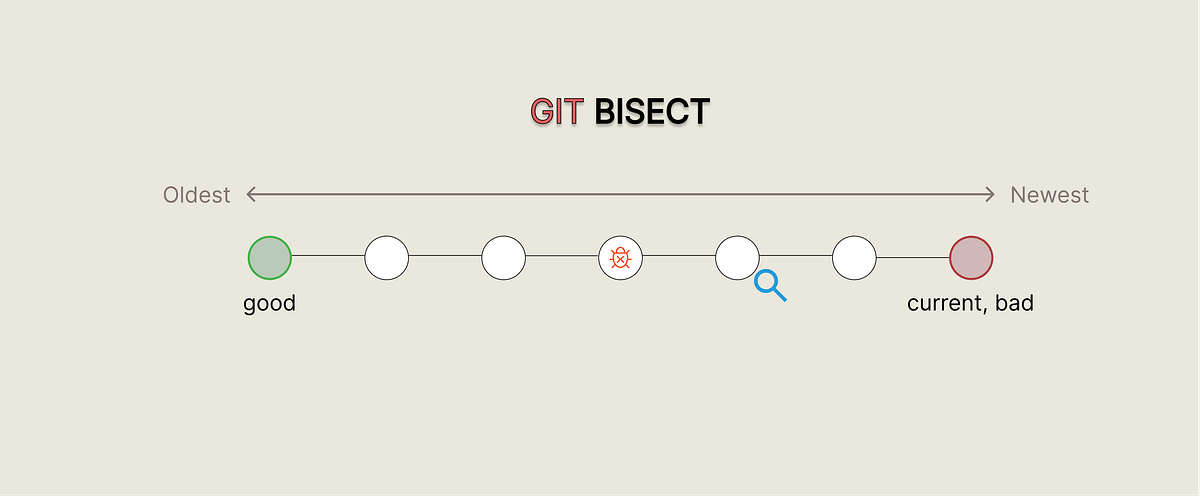
Instead of guessing, let Git tell you who the real culprit is.
What exactly is Git Bisect?
Imagine you're working on a large project and suddenly a bug appears — but you have no idea when and where it was introduced. Now you need to find the commit that caused the issue among hundreds of commits.
This is where Git Bisect steps in.
Git Bisect is a tool inside Git that helps you quickly locate the faulty commit using binary search.
Instead of checking every single commit, Bisect cuts the search in half at each step and drastically reduces the number of commits you need to inspect.
Why should you use Git Bisect?
- Saves time:
If you have 100 commits, binary search lets you find the buggy one in around 7 steps. - More accuracy:
Bisect follows a structured search pattern, making it much more reliable than trial and error. - Perfect for legacy codebases:
When you're dealing with old code with poor documentation, Bisect can be a lifesaver.
How to use Git Bisect
git bisect start        # Start bisecting
git bisect bad          # Mark the current commit as bad
git checkout 25e4a26    # Switch to a known-good commit
git bisect good         # Mark that commit as good

# Git now automatically jumps between commits.
# After testing each step, run:

git bisect good         # If this commit works correctly
git bisect bad          # If this commit is broken

# After Git finds the faulty commit:
git bisect reset        # Exit bisect mode and return to your branch
Why Many Developers Don’t Use Git Bisect
- They think it's complicated:
Many developers assume Bisect requires some unusual skill, while in reality it’s just a few simple commands.
Ironically, it’s often the easiest way to find the root cause of a bug. - Fear of messing with Git history:
A common worry is: “What if I break something? What if a commit gets deleted by mistake?”
But Bisect never modifies history — it only jumps back and forth between commits.
And in the end,git bisect resetsafely restores your original state. - They believe guessing is faster:
Some prefer relying on intuition — “I think the issue came from this commit...”
But guessing usually wastes more time and comes with a higher chance of missing the actual cause. - They simply don’t know it exists:
Many developers have never even heard of Git Bisect.
If you haven’t tried it yet, give it a shot.
Tips for Using Git Bisect Effectively
- Always have at least one reliable “good” commit.
Bisect works correctly only if you mark a commit that you’re genuinely sure is bug-free. - Tag important commits.
Tags help you quickly jump back to known stable points. - Keep your build environment clean.
Sometimes bugs come from outdated cache or an old build.
Cleaning and rebuilding before each test ensures accurate results.
Final Thoughts
Git Bisect is a simple and powerful way to find the exact commit that introduced a bug.
Instead of digging through your entire commit history, Git guides you through a few tests and points you straight to the problem.
If you're dealing with a stubborn bug and have no idea when it started, Bisect is usually the fastest solution you have.